
Isaac Longoria
March 4, 2026
At RiverCity Creatives, we don’t install Google Analytics as a vanity metric.
We implement analytics as a decision-making tool that helps businesses understand how their website is performing and where real growth opportunities exist.
Our implementation is designed to:
The goal isn’t just tracking traffic — it’s turning website data into clear insights that help businesses grow.
Many Google Analytics implementations become difficult to manage over time.
You’ll often see issues like:
Over time, this leads to unreliable data and a system that’s hard to maintain.
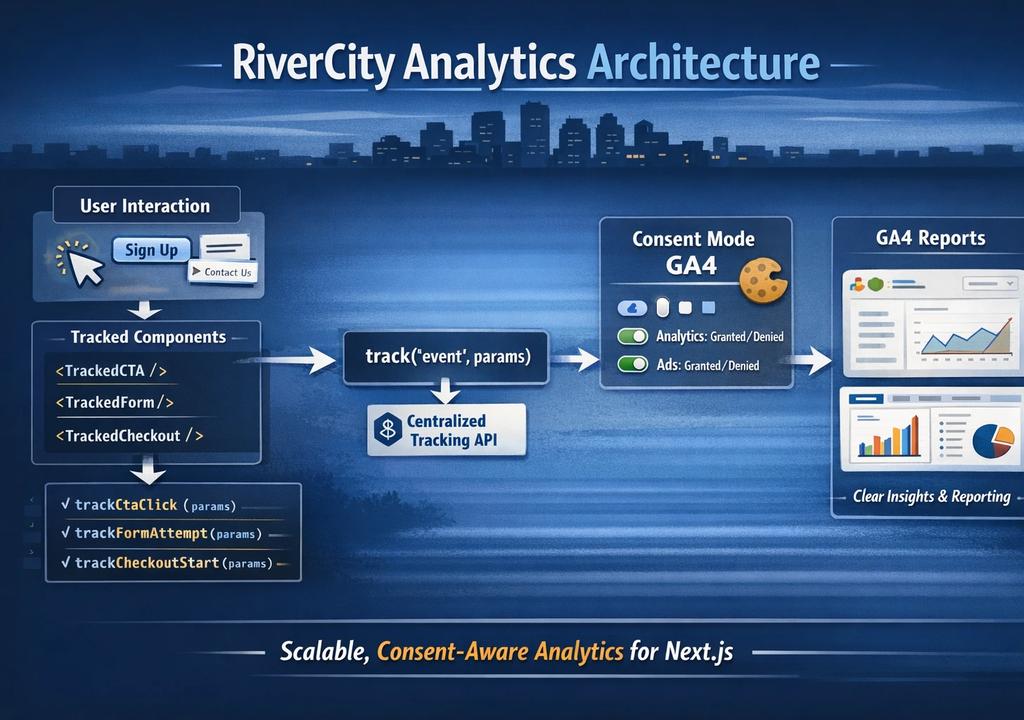
To avoid this, we developed a standardized analytics architecture that keeps tracking clean, scalable, and consistent across every project.
Here’s how it works.
Every client website should have a clean, reliable analytics foundation.
Our goal is to ensure each site:
This approach ensures analytics remain accurate, scalable, and easy to maintain as the website grows.
At RiverCity Creatives, we treat analytics like infrastructure — not a plugin.
Modern websites cannot legally track visitors without proper disclosure and consent.
Before analytics tracking begins, a website should clearly provide:
When implemented correctly, analytics can still provide valuable insights while respecting user privacy and regulatory requirements.
At RiverCity Creatives, every analytics implementation is built with privacy and consent built into the foundation.
We separate concerns clearly:
1/lib/analytics/        → core tracking logic
2/components/analytics/ → GA loader + tracked components
3/app/layout.tsx        → mounts analytics once
This ensures:
Below is a simplified look at the files that power our analytics system.
Rather than scattering tracking logic across dozens of components, we isolate analytics into a small set of purpose-built modules.
This keeps the system predictable, maintainable, and scalable across projects.
The first piece of the system is the consent layer.
This file acts as the single source of truth for cookie preferences and consent state.
It defines:
This ensures analytics can respect privacy decisions before any tracking occurs.
1// /lib/analytics/consent.ts
2
3export const COOKIE_KEY = "cookiePreferences";
4export const CONSENT_EVENT = "cookie_consent_update";
5
6export type CookiePrefs = {
7  functional: boolean;
8  statistical: boolean;
9  marketing: boolean;
10};
11
12export function readCookiePrefs(): CookiePrefs | null {
13  if (typeof document === "undefined") return null;
14
15  try {
16    const raw = document.cookie
17      .split("; ")
18      .find((r) => r.startsWith(`${COOKIE_KEY}=`))
19      ?.split("=")[1];
20
21    if (!raw) return null;
22
23    const parsed = JSON.parse(decodeURIComponent(raw));
24    if (
25      typeof parsed?.functional === "boolean" &&
26      typeof parsed?.statistical === "boolean" &&
27      typeof parsed?.marketing === "boolean"
28    ) {
29      return parsed as CookiePrefs;
30    }
31    return null;
32  } catch {
33    return null;
34  }
35}
Here we define the structure of the consent system:
COOKIE_KEY identifies where the cookie preferences are storedCONSENT_EVENT allows the app to react when preferences changeCookiePrefs defines the allowed preference types1// /lib/analytics/consent.ts
2
3export function readCookiePrefs(): CookiePrefs | null {
4 if (typeof document === "undefined") return null;
5 /// rest of code //
6}This function retrieves the stored cookie preferences and validates them before they are used.
Key responsibilities of this function:
null if the data is invalid or missingThis validation step ensures analytics logic never runs on malformed or unexpected data.
This file becomes the foundation of the privacy system, allowing Google Consent Mode and analytics tracking to respond dynamically when user preferences change.
track() APIOne of the most common analytics mistakes is calling window.gtag() directly throughout the application.
When this happens:
Instead, we expose a single tracking function.
1// /lib/analytics/track.ts
2
3"use client";
4
5type TrackParams = Record<string, any>;
6
7export function track(eventName: string, params: TrackParams = {}) {
8  if (typeof window === "undefined") return;
9  if (typeof window.gtag !== "function") return;
10
11  const page_path = window.location?.pathname ?? "";
12  const page_title = document?.title ?? "";
13
14  window.gtag("event", eventName, {
15    page_path,
16    page_title,
17    ...params,
18  });
19}
This function acts as a gateway to Google Analytics.
Before sending an event, it:
Every event sent through this function automatically includes:
This keeps analytics data consistent without requiring developers to manually include context on every event.
The final piece of the system is the event dictionary.
Instead of letting each project invent its own event names, we define typed tracking functions.
This ensures every event:
1// /lib/analytics/events.ts
2
3export function trackCtaClick(params: {
4  cta_id: string;
5  label: string;
6  location: string;
7  href?: string;
8}) {
9  track("cta_click", params);
10}
This wrapper function ensures that CTA clicks are always tracked the same way.
Instead of writing custom analytics logic inside components, developers simply call:
trackCtaClick(...)
Additional wrappers define other key interactions:
1export function trackFormAttempt(params: { form_id: string; location: string }) {
2  track("form_submit_attempt", params);
3}
4
5export function trackFormSuccess(params: { form_id: string; location: string }) {
6  track("form_submit_success", params);
7}
8
9export function trackCheckoutStart(params: {
10  product_id: string;
11  value?: number;
12  currency?: string;
13}) {
14  track("checkout_start", { currency: "USD", ...params });
15}
Each wrapper maps to a standardized event name in GA4.
This approach guarantees:
When analytics is deployed across multiple websites and businesses, this level of standardization becomes extremely valuable.
With the analytics infrastructure in place, the next step is integrating it into the application itself.
Rather than sprinkling analytics logic throughout the codebase, we create reusable components that handle tracking automatically.
This keeps analytics:
In this layer we handle three important responsibilities:
The AnalyticsGA4 component is responsible for loading Google Analytics safely and configuring Consent Mode.
It ensures that analytics scripts are initialized correctly and that tracking respects user consent preferences.
1// /app/components/analytics/AnalyticsGA4.tsx
2
3"use client";
4
5import Script from "next/script";
6import { useEffect } from "react";
7import Cookies from "js-cookie";
8
9const GA_ID = process.env.NEXT_PUBLIC_GA_ID;
10
11type CookiePrefs = {
12  functional: boolean;
13  statistical: boolean;
14  marketing: boolean;
15};
16
17const COOKIE_KEY = "cookiePreferences";
18
19function safeParsePrefs(raw: string | undefined): CookiePrefs | null {
20  if (!raw) return null;
21  try {
22    const parsed = JSON.parse(raw);
23    if (
24      typeof parsed?.functional === "boolean" &&
25      typeof parsed?.statistical === "boolean" &&
26      typeof parsed?.marketing === "boolean"
27    ) {
28      return parsed as CookiePrefs;
29    }
30    return null;
31  } catch {
32    return null;
33  }
34}
35
36export default function AnalyticsGA4() {
37  // 1) Listen for consent updates (from banner/modal)
38  useEffect(() => {
39    const onConsentUpdate = (e: Event) => {
40      const detail = (e as CustomEvent<CookiePrefs>).detail;
41      if (!detail) return;
42
43      window.gtag?.("consent", "update", {
44        analytics_storage: detail.statistical ? "granted" : "denied",
45        ad_storage: detail.marketing ? "granted" : "denied",
46      });
47    };
48
49    window.addEventListener("cookie_consent_update", onConsentUpdate as EventListener);
50    return () => {
51      window.removeEventListener("cookie_consent_update", onConsentUpdate as EventListener);
52    };
53  }, []);
54
55  // 2) Upgrade immediately if consent already exists
56  useEffect(() => {
57    const prefs = safeParsePrefs(Cookies.get(COOKIE_KEY));
58    if (!prefs) return;
59
60    window.gtag?.("consent", "update", {
61      analytics_storage: prefs.statistical ? "granted" : "denied",
62      ad_storage: prefs.marketing ? "granted" : "denied",
63    });
64  }, []);
65
66  if (!GA_ID) return null;
67
68  return (
69    <>
70      {/* MUST run first */}
71      <Script id="ga-consent-defaults" strategy="beforeInteractive">
72        {`
73          window.dataLayer = window.dataLayer || [];
74          function gtag(){dataLayer.push(arguments);}
75          window.gtag = gtag;
76
77          gtag('consent', 'default', {
78            analytics_storage: 'denied',
79            ad_storage: 'denied',
80            functionality_storage: 'granted',
81            security_storage: 'granted'
82          });
83        `}
84      </Script>
85
86      <Script
87        src={`https://www.googletagmanager.com/gtag/js?id=${GA_ID}`}
88        strategy="afterInteractive"
89      />
90
91      <Script id="ga-init" strategy="afterInteractive">
92        {`
93          gtag('js', new Date());
94          gtag('config', '${GA_ID}', {
95            anonymize_ip: true,
96            allow_google_signals: false,
97            send_page_view: true
98          });
99        `}
100      </Script>
101    </>
102  );
103}This component handles the entire Google Analytics lifecycle.
First, it defines default consent settings before the GA script loads.
By default, analytics storage is denied until the user grants permission.
Second, it listens for consent updates from the cookie banner using a custom event:
cookie_consent_update
When that event fires, the component immediately updates Google Consent Mode.
Finally, if the user has previously stored cookie preferences, the component restores those preferences automatically when the page loads.
This ensures analytics behavior is always synchronized with user consent.
With Google Analytics initialized, the next step is making analytics available throughout the application.
Instead of importing tracking utilities everywhere, we expose analytics through a React context provider.
This allows any component in the app to trigger events through a simple hook.
1// /app/components/analytics/AnalyticsProvider.tsx
2
3"use client";
4
5import React, { createContext, useCallback, useContext, useMemo } from "react";
6import { track as trackFn } from "@/lib/analytics/track";
7
8type TrackParams = Record<string, any>;
9type AnalyticsContextValue = { track: (event: string, params?: TrackParams) => void };
10
11const AnalyticsContext = createContext<AnalyticsContextValue | null>(null);
12
13export function AnalyticsProvider({ children }: { children: React.ReactNode }) {
14  const track = useCallback((event: string, params?: TrackParams) => {
15    trackFn(event, params ?? {});
16  }, []);
17
18  const value = useMemo(() => ({ track }), [track]);
19  return <AnalyticsContext.Provider value={value}>{children}</AnalyticsContext.Provider>;
20}
21
22export function useTrack() {
23  return useContext(AnalyticsContext) ?? { track: (_e: string, _p?: TrackParams) => {} };
24}This provider creates a clean interface for analytics across the entire application.
Instead of importing tracking utilities directly, components can simply use:
useTrack()
This pattern keeps analytics:
It also prevents analytics logic from spreading across the codebase.
Call-to-action elements are some of the most important interactions on a website.
Rather than requiring developers to manually add tracking logic to every button or link, we create tracked UI components.
These components automatically fire analytics events when users interact with them.
1// /app/components/analytics/TrackedCTA.tsx
2
3"use client";
4
5import Link from "next/link";
6import { trackCtaClick } from "@/lib/analytics/events";
7import React from "react";
8
9type TrackedCTAProps = {
10  href: string;
11  cta_id: string;
12  location: string;
13  label?: string;
14  className?: string;
15  onClick?: React.MouseEventHandler<HTMLAnchorElement>;
16  children: React.ReactNode;
17};
18
19export function TrackedCTA({
20  href,
21  cta_id,
22  location,
23  label,
24  className,
25  onClick,
26  children,
27}: TrackedCTAProps) {
28  const handleMouseDown: React.MouseEventHandler<HTMLAnchorElement> = (e) => {
29    // Fire analytics early (more reliable than click)
30    const analyticsLabel = label || (typeof children === 'string' ? children : cta_id);
31    trackCtaClick({ cta_id, label: analyticsLabel, location, href });
32  };
33
34  const handleClick: React.MouseEventHandler<HTMLAnchorElement> = (e) => {
35    // Allow parent click logic (close menus, etc.)
36    onClick?.(e);
37  };
38
39  return (
40    <Link
41      href={href}
42      onMouseDown={handleMouseDown}
43      onClick={handleClick}
44      className={className}
45    >
46      {children}
47    </Link>
48  );
49}Tracking is triggered using onMouseDown instead of onClick.
This is a subtle but important improvement.
When navigation occurs quickly, onClick events can sometimes be lost before analytics fires.
Triggering the event on onMouseDown ensures the tracking event fires before the page transition begins.
By wrapping CTAs in a reusable component like this, we guarantee that important actions such as:
are tracked consistently across the entire website.
The final step is wiring the analytics system into the root layout of the application.
In Next.js, the root layout is the ideal place to initialize analytics because it ensures:
Inside the layout we mount three key components:
1. AnalyticsGA4
This component initializes the entire Google Analytics system.
It:
Because this component sits at the top of the layout, analytics is initialized as soon as the application loads.
2. CookieBanner
The cookie banner allows visitors to manage their tracking preferences.
When users update their settings, the banner dispatches the event:
cookie_consent_update
The analytics system listens for this event and updates Google’s Consent Mode configuration immediately.
This keeps analytics fully synchronized with user consent.
3. AnalyticsProvider
Finally, the AnalyticsProvider wraps the entire application.
This makes the analytics system available to every component through the useTrack() hook.
Instead of importing analytics utilities throughout the codebase, components can simply call:
useTrack()
to send events through the centralized tracking system.
1import type { ReactNode } from "react";
2
3import AnalyticsGA4 from "@/app/components/analytics/AnalyticsGA4";
4import { AnalyticsProvider } from "@/app/components/analytics/AnalyticsProvider";
5import CookieBanner from "@/app/components/cookies/CookieBanner";
6
7export default function RootLayout({ children }: { children: ReactNode }) {
8  return (
9    <html lang="en">
10      <body className="antialiased overflow-x-hidden bg-navy-500">
11        <AnalyticsGA4 />
12        <CookieBanner />
13        <AnalyticsProvider>
14          {children}
15        </AnalyticsProvider>
16      </body>
17    </html>
18  );
19}By the time the application renders, the website now has:
Analytics is no longer a script added to the page — it becomes part of the application's infrastructure.
Before we consider analytics production-ready, we verify:
gtag('config') callsAnalytics should be treated like application infrastructure, not a plugin.
Analytics is not a vanity metric.
Without clean tracking, you cannot answer critical questions like:
If you don’t have:
you don’t have optimization.
And if you can’t measure performance, you can’t scale revenue.
That’s why we build websites as revenue assets, not digital brochures.
Analytics is the nervous system behind that system.
Installing Google Analytics takes five minutes.
Implementing it correctly — with privacy compliance, performance safeguards, and scalable tracking architecture — requires intentional structure.
This is the RiverCity standard.
If your website currently has:
then you're likely missing critical insight into how your website actually performs.
At RiverCity Creatives, we design and build websites that function as revenue-generating systems, with analytics integrated from the foundation.
If you'd like help auditing or implementing a proper analytics setup:
→ Book a Website Strategy Call or give us a call at 210-730-6232.
No obligation. Just a practical conversation about improving your website.
We'll review:

Contact Us
Follow Us


Free Website Revenue Checklist— Discover quick wins to turn your website into a revenue machine.
Get Free Checklist
Free Website Revenue Checklist — Discover quick wins to turn your website into a revenue machine.
Get Free ChecklistServices